

Indian buyers do not open email. They message. They browse a product on Instagram, tap “Chat on WhatsApp”, ask the price, and decide within minutes whether you are worth their time.
The problem for most businesses isn’t lead volume — it’s what happens after the lead lands. The enquiry hits a personal WhatsApp number, gets buried under family groups and vendor chats, and by the time someone opens it, the customer has bought elsewhere. There is no record, no owner, no follow-up, and no way to know how many deals were lost that way.
A WhatsApp CRM for Indian businesses closes that gap. Instead of one phone and one overwhelmed person, you get a shared inbox, automatic assignment, lead tagging, chatbot qualification, and a permanent conversation history tied to a pipeline stage.
For ecommerce and COD brands, real estate teams, coaching institutes, clinics, salons, and D2C stores, this is usually the single highest-leverage change available to how inbound demand is handled — higher-leverage than more ad spend.
A WhatsApp CRM sits on top of the official WhatsApp Business API and adds the structure a growing team needs.
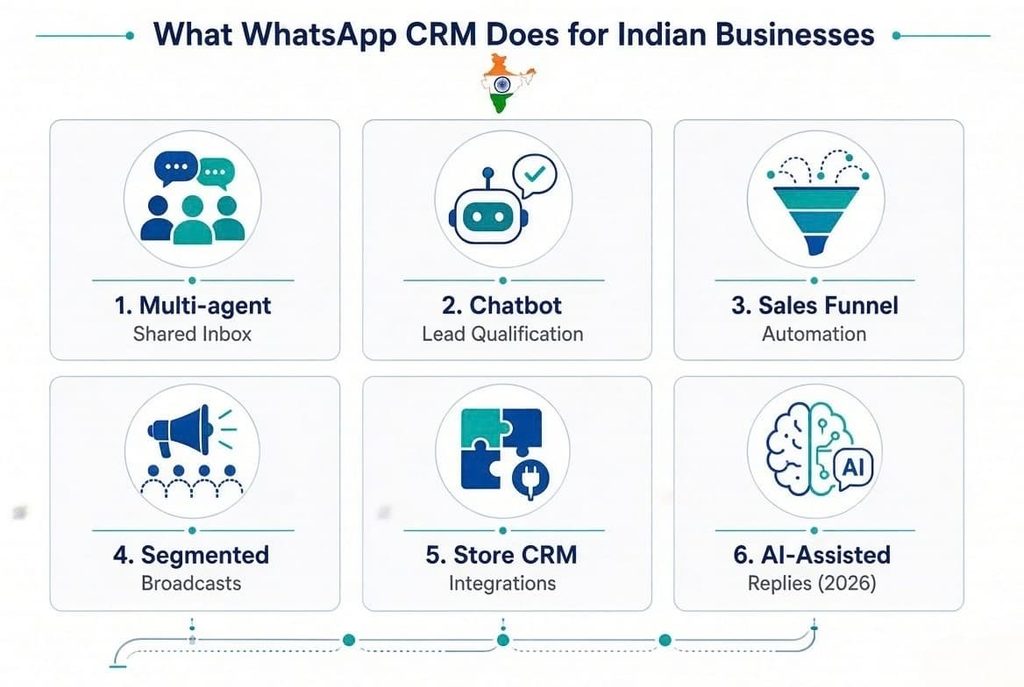
Five people can work one WhatsApp number at the same time. Conversations are auto-assigned by round robin, by language, by product line, or by region, and nothing sits unanswered because “someone else was handling it”. This alone fixes the one-phone-one-person bottleneck that every growing Indian business eventually hits.
Drag-and-drop bots greet the customer, ask two or three qualifying questions — budget, city, requirement, timeline — and route hot leads to a human while filtering out the rest. This matters most between 10 PM and 9 AM, when a slow reply is the difference between a sale and a lost customer.
Leads from click-to-WhatsApp ads, website widgets, QR codes, and WhatsApp Flows forms enter the pipeline automatically, move through stages, and trigger reminders when they go cold. The chat history stops being a chat history and starts being a sales record.
Segmented broadcasts to tagged audiences — past buyers, abandoned carts, a specific city, a specific course batch — with delivery, read, and reply tracking, plus retargeting of people who opened but didn’t respond.
Shopify, WooCommerce, Google Sheets, Zoho, HubSpot, Razorpay. Order confirmations, COD verification, abandoned-cart recovery, payment reminders, and delivery updates fire without anybody typing them.
Modern setups now use AI to draft replies from your catalogue and FAQ, summarise long chats for the agent taking over, and auto-tag intent. Useful — but note that after 1 October 2026, every AI or human reply inside the service window is billable, which changes how these should be designed. More on that below.
This is where most competing guides are now out of date, so read this section carefully.
Meta prices the WhatsApp Business Platform by conversation category, and India has its own rate card. Historically, there were four categories:
| Category | What it covers | Old position |
| Marketing | Offers, promotions, product launches, re-engagement | Highest rate |
| Utility | Order updates, delivery, payment reminders, booking confirmations | Moderate rate |
| Authentication | OTPs and login verification | Moderate rate |
| Service | Free-form replies inside the 24-hour customer-initiated window | Free |
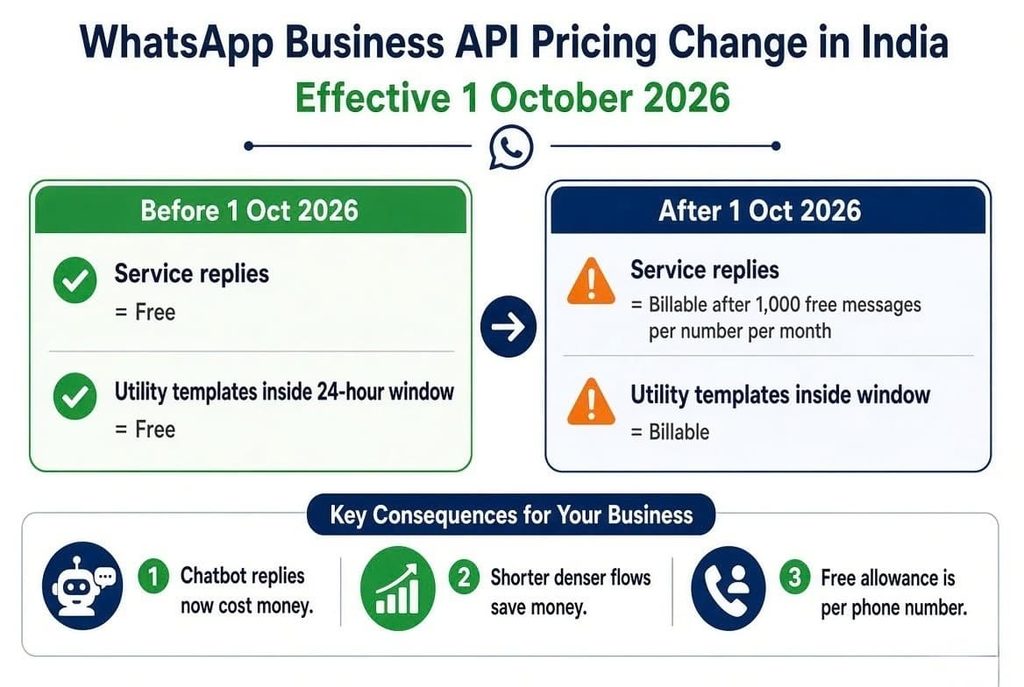
Meta now charges on a per-message basis for service messages — the free-form, non-template replies sent inside an open customer service window — at the same rates as utility and authentication messages for that market, with a new free allowance of 1,000 service messages per business phone number per month. Charges begin from the 1,001st service message delivered in a month; the allowance resets monthly, and unused messages do not roll over.
Separately, utility template messages sent as a reply inside an open 24-hour window — free since July 2025 — are now chargeable as well. The sending rules haven’t changed; only the billing has.
Three practical consequences for Indian businesses:
Meta publishes exact INR figures in downloadable rate cards rather than in article text, and they move every quarter, so always check the current card for your billing currency instead of trusting a number in a blog post. Meta also runs regular quarterly rate-card updates that raise or lower marketing, utility, and authentication rates in specific markets.
On top of Meta’s conversation charges, you pay a platform or software fee for the CRM layer itself — the chatbot builder, shared inbox, broadcast tools, analytics, and agent seats. Typically billed monthly or annually, often tiered by number of agents or contacts.
Any agency worth hiring will split the quote into three lines: Meta conversation cost (estimated from your volume), platform fee, and one-time setup/automation build. If you receive a single vague number, ask for the breakdown before signing.
A lot of Indian businesses buy the wrong thing because these three get used interchangeably.
| WhatsApp Business App | WhatsApp Business API | WhatsApp CRM (API + platform) | |
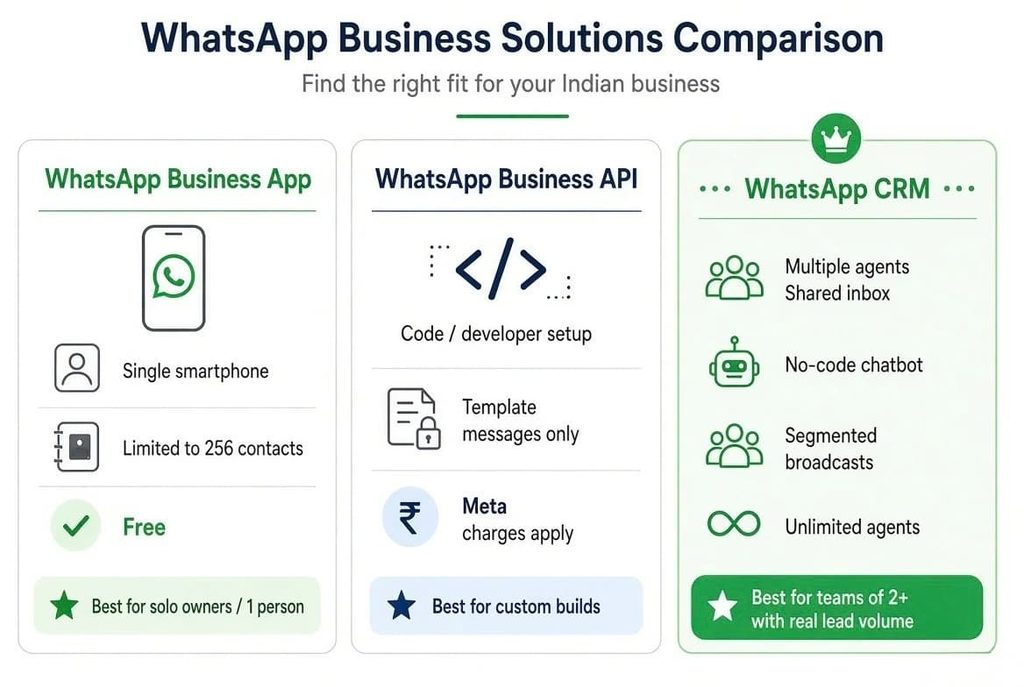
| Best for | Solo owners, single-location shops | Developers, custom builds | Teams of 2+ with real lead volume |
| Users on one number | 1 phone + limited linked devices | Depends on the build | Unlimited agents, shared inbox |
| Broadcasts | 256 contacts, saved numbers only | Template-based, unlimited | Segmented, tagged, tracked |
| Chatbots | Away message only | Must be coded | No-code visual builder |
| Green tick | No | Eligible | Eligible, agency-handled |
| Cost | Free | Meta conversation charges | Meta charges + platform fee |
| Data ownership | On the phone | Yours | Yours, exportable |
If you are past roughly 30–40 enquiries a day, or more than one person is answering, the App has already stopped being viable.
Software is largely commoditised. The implementation is not. Here is what to test before signing.
1. Are they an official BSP or a reseller of a reseller? Business Solution Provider status affects how fast your WABA gets verified, how reliably templates clear, and who you escalate to when messages start failing at 9 PM on a sale day. Ask directly.
2. Do they handle Meta template approval themselves? Rejections and — more expensively — re-categorisations cost money. Charges follow the category assigned to a template at the time of use, and the business is responsible for reviewing that categorisation. A template you think is utility but Meta reads as marketing quietly multiplies your bill. Experienced agencies draft to avoid this.
3. Can they design flows for your industry? A real-estate qualification flow (budget, possession timeline, locality, site-visit slot) looks nothing like a restaurant booking flow or a COD confirmation flow. Ask to see a flow diagram for a business like yours, not a generic demo.
4. Do they optimise for the new pricing? Post-October 2026, ask the agency how they plan to keep service-message volume efficient. If they have no answer, they are still building flows for last year’s rate card.
5. Do they integrate with your existing stack? Shopify, WooCommerce, Google Sheets, Zoho, Razorpay, your ERP. Manual data entry between systems eats the time automation was supposed to give you back.
6. What does support look like after go-live? Setup takes days. ROI takes months of tuning — reviewing drop-off points in the bot, rewriting the first message, resegmenting broadcast lists. Ask what the first 90 days include.
7. Who owns the WABA? Your Business Manager should own your WhatsApp Business Account, with the agency as an assigned partner. If the agency owns it, moving providers later means losing your number’s history and rating.
This is exactly the gap SigmaFlux Agency closes for businesses in Mumbai and across India — BSP onboarding, template approval and categorisation strategy, custom chatbot flows, store and CRM integration, and ongoing optimisation handled end-to-end. See how it comes together on our WhatsApp marketing page.
Most Indian businesses go live within two to three weeks.
| Stage | What happens | Typical duration |
| 1. Business verification | Facebook Business Manager setup, GST/CIN and business documents, WABA application, number verification | 2–5 days |
| 2. Template drafting and approval | Message templates written by category, submitted to Meta, approved or revised | 1–2 days per round |
| 3. Chatbot and flow build | Qualification flows, auto-assignment rules, tags, pipeline stages | 3–5 days |
| 4. Integration | Website widget, click-to-WhatsApp ads, Shopify/WooCommerce/Sheets/CRM | 2–5 days |
| 5. Go-live and tuning | Agent training, live monitoring, flow adjustments | Ongoing |
Green tick (official business account) verification runs on its own timeline and typically requires press mentions and brand notability — treat it as a later milestone, not a launch blocker.
Ecommerce and COD stores. WhatsApp-based COD order confirmation cuts return-to-origin losses sharply, and abandoned-cart recovery messages are among the highest-ROI automations available to an Indian D2C brand.
Real estate. Inbound portal and ad leads get qualified in seconds — budget, locality, timeline — and hot leads land with a human agent while intent is still live.
Education and coaching. Course enquiries, admission document collection, fee reminders, batch announcements, and parent updates, all from one number with a proper record per student.
Restaurants, salons and clinics. Bookings, confirmations, and reminders without a person managing every chat — and no-show reduction from a single reminder template.
D2C brands. Segmented broadcasts with read and reply tracking, so you can finally see which campaign actually produced revenue rather than guessing from open rates.
B2B and manufacturing. Catalogue sharing, quotation follow-ups, and dealer or distributor communication that doesn’t disappear into a sales rep’s personal phone when they resign.
For any Indian business that depends on fast, high-volume customer conversations, a WhatsApp CRM is close to table stakes in 2026. But the economics changed on 1 October — replies are no longer free, and flow design is now a cost centre as well as a conversion lever. That makes the implementation partner more important than the software logo on the dashboard.
For businesses in Mumbai and across India that want this set up correctly the first time, SigmaFlux Agency handles the whole path — API verification, template approval and categorisation, automation design, integration and ongoing optimisation. Learn more on our WhatsApp marketing services page.
What is a WhatsApp CRM?
A WhatsApp CRM is a system built on the official WhatsApp Business API that lets a team manage conversations, automate replies, assign and tag leads, and track sales from a shared inbox instead of a single personal phone number.
How much does a WhatsApp CRM cost in India?
Two parts. First, Meta’s per-conversation charges by category — marketing, utility, authentication, and, since 1 October 2026, service messages as well. Second, the platform or agency fee covering the chatbot builder, shared inbox, broadcasts, analytics and support. Exact Meta rates are published in quarterly rate cards, so ask for a volume-based estimate rather than a flat claim.
Are WhatsApp service replies still free in India?
No. From 1 October 2026, service messages inside an open 24-hour window are charged at utility/authentication rates, with 1,000 free service messages per business phone number each month; billing starts from the 1,001st message and the allowance resets monthly without rollover.
How long does setup take?
Business verification usually takes two to five days, template approval one to two days per round, and chatbot plus integration work another five to ten days depending on complexity. Most businesses are live in two to three weeks.
Can I use my existing WhatsApp number for the API?
Usually yes, provided the number isn’t currently active on the WhatsApp Business App. If it is, it must be migrated — an agency can guide you through it so you don’t lose contacts or continuity.
Will my existing chat history carry over to the API?
Chat history from the app does not transfer to the API platform. Contacts and the number itself do. Export anything you need before migration.
Does a WhatsApp CRM work with Shopify or WooCommerce?
Yes. Standard integrations cover order confirmation, COD verification, shipping updates, abandoned-cart recovery, and payment reminders, triggered automatically from store events.
Which businesses in India benefit most?
Ecommerce and COD stores, real estate, education and coaching, clinics, salons and restaurants, and D2C brands — anyone handling quick, high-volume conversations that are impossible to manage manually.
Do I need a green tick to use the API?
No. The green tick (official business account) is a separate verification based on brand notability and is not required to send messages or run automations.
How do I reduce my WhatsApp API costs?
Keep bot flows short, use buttons and list replies instead of multiple message bubbles, categorise templates accurately, concentrate service traffic sensibly across phone numbers to use free allowances, and re-engage inside the free window where possible rather than sending new marketing templates.
Blog Url
https://sigmaflux.com/whatsapp-crm-software-features-lead-management-guide/
https://sigmaflux.com/how-to-use-your-existing-number-with-the-whatsapp-api-for-bulk-whatsapp-marketing/