

API for bulk marketing purposes is uncomplicated and very straightforward. If you have your business using an active phone number that your customers are familiar with, you have the possibility of migrating your pre-existing number to the WhatsApp API without having to lose any chat conversation data during the transfer.
That is important as most Indian companies, including those in Mumbai, have been running the WhatsApp Business application on that phone number for quite some time now. Migrating to the API doesn’t mean changing your number – it means adding capabilities to it, enabling you to conduct bulk messaging and automate conversations via CRM.
Here is the complete guide to migrating your number and conducting bulk marketing via the API.
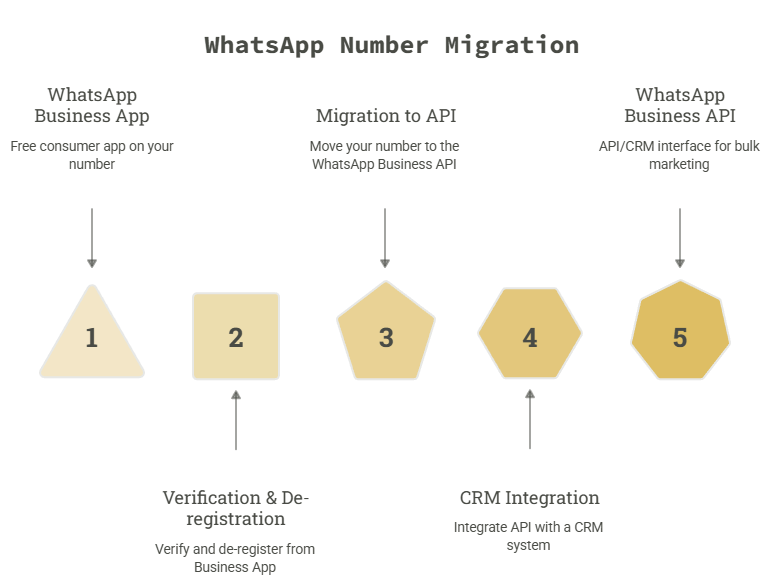
The WhatsApp Business API is a product of Meta that allows businesses to exchange messages via WhatsApp using software and not an app on their phones. The WhatsApp Business API is meant to cater to businesses that deal with high volumes of messages, have many support personnel, or require automation, which is impossible using the app itself.
In contrast to the app, the API does not have its own chat interface; thus, it needs to be connected to some CRM or messaging system, such as the SigmaFlux WhatsApp API CRM.
Yes. Meta allows you to migrate an existing WhatsApp number — one already active on the WhatsApp Business App or even a personal WhatsApp account — onto the Business API, as long as it meets a few conditions.
Your number qualifies if:
Once the phone number is operational on the WhatsApp API, it cannot be used in the official WhatsApp Business application anymore.
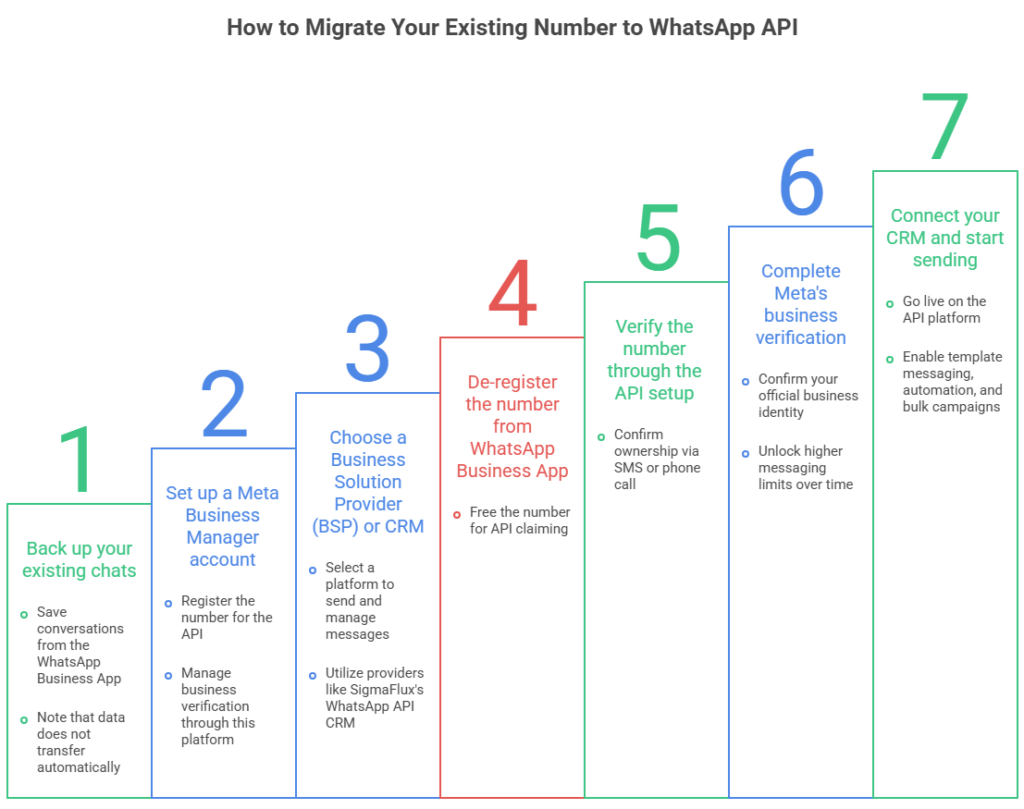
Migrating a number is a defined process, not a guess-and-check exercise. Here’s the sequence:
Most migrations, when the business documentation is ready in advance, are completed within 24–48 hours.
A few practical points that aren’t always obvious upfront:
Once your number is live on the API, bulk marketing works differently from a manual broadcast list on the app.
Here’s what changes:
| Aspect | WhatsApp Business App | WhatsApp API (with CRM) |
| Sending limit | ~256 contacts per broadcast | Thousands, based on tier |
| Message type | Free-form text | Pre-approved templates for promotions |
| Automation | Manual only | Auto-replies, drip sequences, chatbots |
| Team access | Single device | Multiple agents, shared inbox |
| Tracking | None | Delivery, read, and click reporting |
Can I use the same WhatsApp number on both the app and the API?
No. Once a number is registered to the WhatsApp Business API, it’s removed from the WhatsApp Business App and can only be used through the API/CRM going forward.
Will I lose my existing chats when I migrate?
Yes, unless you back them up first. The API doesn’t inherit chat history from the consumer app, so exporting a backup before de-registering the number is essential.
How long does it take to migrate a number to WhatsApp API?
With business documents and Meta Business Manager verification ready in advance, migration typically takes 24–48 hours.
Do I need Meta’s approval to send bulk marketing messages?
Yes. Any promotional or bulk message sent outside an active customer conversation must use a pre-approved message template.
Is a CRM required to use WhatsApp API, or can I use the API directly?
Technically, you can integrate the raw API yourself, but for day-to-day marketing, automation, and team use, a CRM interface — like SigmaFlux’s WhatsApp API CRM — is what makes it practical to manage.
Moving your existing WhatsApp number to the Business API doesn’t mean starting fresh — it means unlocking bulk marketing, automation, and team collaboration on a number your customers already know. The process is straightforward once your business verification and CRM are in place, and the payoff is a WhatsApp channel that can actually scale with your business instead of being limited to one device and one inbox.
If you’re planning this migration for your business in Mumbai or anywhere in India, SigmaFlux Agency’s WhatsApp API CRM handles the number migration, template approvals, and bulk marketing setup end-to-end.