


Stop losing customer queries in a sea of WhatsApp chats. Learn how a structured WhatsApp support ticketing system can transform your customer service operations — and why Sigmaflux is the trusted WhatsApp partner for businesses across India.
Get a Free Demo. See How It Works
Updated September 202615 min read By Sigmaflux WhatsApp Experts | Mumbai, India
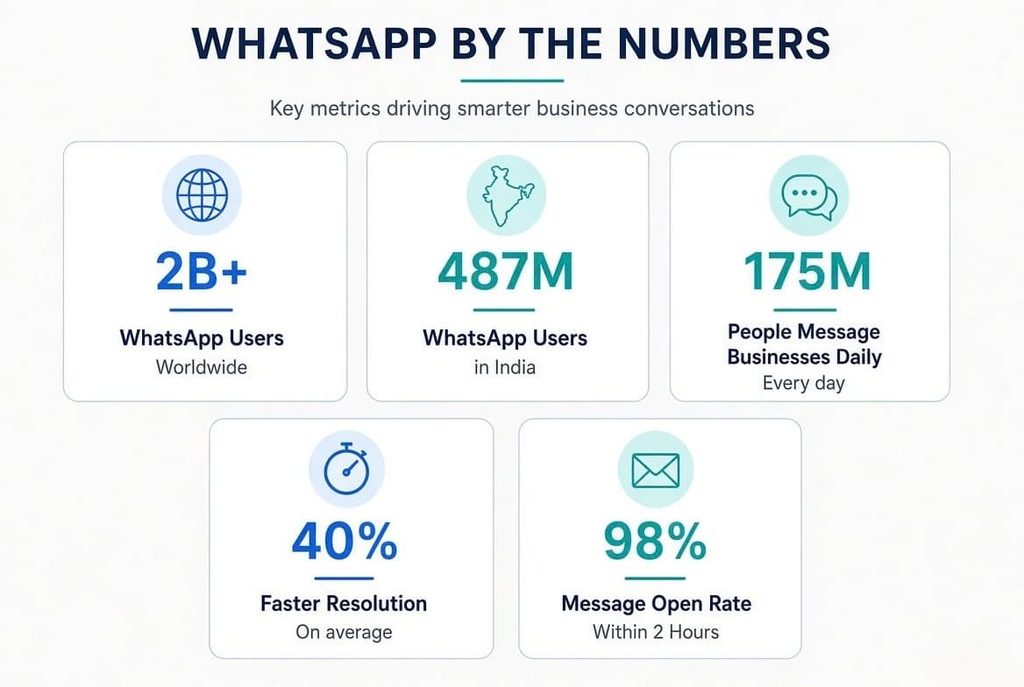
2B+WhatsApp Users Worldwide
487MWhatsApp Users in India
175MPeople Message Businesses Daily
40%Faster Resolution with WhatsApp Ticketing
98%WhatsApp Message Open Rate
WhatsApp Support Ticketing System
A WhatsApp support ticketing system is a platform that converts every incoming WhatsApp message from a customer into a structured, trackable support ticket. Instead of your team scrambling through an unmanaged WhatsApp inbox — missing messages, double-replying, or completely losing context — a ticketing system organises every conversation into a streamlined workflow.
Think of it as your traditional helpdesk, but built around WhatsApp — the channel your customers in India already trust and use every day. When someone sends a message about a delayed order, a billing issue, or a product query, the system instantly logs it as a ticket, assigns it to the right agent, tracks its status, and ensures nothing ever slips through the cracks.
Quick Definition
WhatsApp Support Ticketing System: A software tool that integrates with WhatsApp Business API to capture, categorise, assign, and systematically resolve customer queries — giving support teams full visibility, context, and control over every conversation from one shared inbox.
What makes this different from a standard WhatsApp Business account is the structure behind it. Instead of one person managing one inbox, your entire support team works together in a centralised dashboard — each with their own login, role, and queue of assigned tickets.
India is WhatsApp’s largest market in the world, with over 487 million active users. From a shopkeeper in Dharavi to a tech startup in Bandra Kurla Complex, WhatsApp is how India communicates — personally and professionally.
For businesses in Mumbai specifically, this creates a massive opportunity. Your customers don’t want to fill out a web form, wait for an email response, or call a helpline that puts them on hold for 20 minutes. They want to send a WhatsApp message and get a reply quickly. That expectation is not going away — it’s only getting stronger.
🇮🇳 India-Specific Insight
According to Meta’s data, Indian SMBs that adopt WhatsApp Business API see up to 3x higher customer engagement compared to email-only support. In tier-1 cities like Mumbai, Pune, and Bengaluru, customers now expect WhatsApp support as a baseline — not a premium offering.
Still, most Indian businesses handle WhatsApp support the old way: one phone, one inbox, one overwhelmed support executive. When message volumes grow — especially during festive seasons like Diwali or flash sales — the system breaks down. Tickets get missed. Customers get frustrated. Revenue walks away.
A dedicated WhatsApp support ticketing system company in Mumbai like Sigmaflux solves this exact problem by bringing order, automation, and accountability to your WhatsApp customer service operations.
Understanding how it works helps you appreciate its value. Here is the end-to-end flow of a WhatsApp ticketing system built on the WhatsApp Business API:
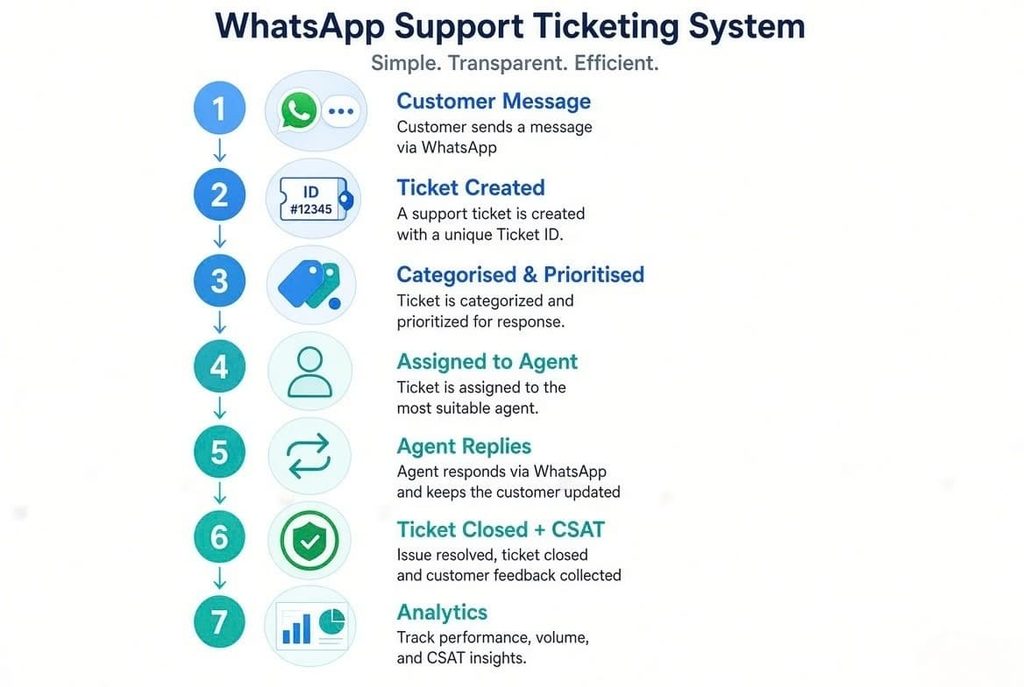
A customer messages your business WhatsApp number — asking about an order, raising a complaint, or requesting a quote. This is the trigger point for everything that follows.
The system instantly captures the message, creates a ticket with a unique ID, and timestamps it. Customer profile details, conversation history, and past interactions are automatically attached for context.
Based on keywords, customer type, or department, the system categorises the ticket — billing, logistics, technical support, pre-sales query, and so on. High-priority customers or escalations are flagged immediately.
Using smart routing rules — round-robin, skills-based, or contact-owner routing — the ticket lands in the right agent’s queue. If your team is offline, a chatbot handles the initial response and collects details.
Your support executive sees the full conversation thread, customer history, and any internal notes left by teammates. They reply directly from the shared inbox — the customer sees it as a normal WhatsApp message.
Once the issue is resolved, the agent marks the ticket as closed. An optional CSAT (Customer Satisfaction) survey is sent automatically to collect feedback. The entire interaction is stored for reporting and training purposes.
Managers access reports on first response time, resolution time, ticket volume by category, agent performance, and customer satisfaction scores — all from a central dashboard.
Not all WhatsApp ticketing platforms are built the same. When evaluating options — especially as a business in Mumbai or anywhere in India — here are the capabilities that actually matter:
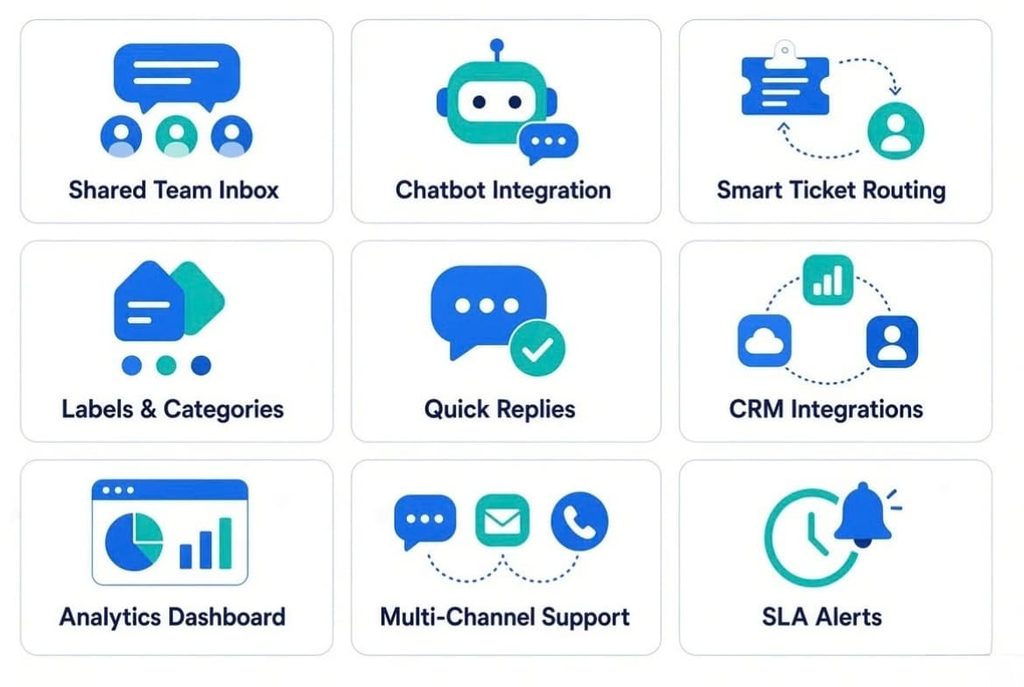
Shared Team Inbox
One WhatsApp number is managed by several agents from a single dashboard. No message duplication, no missed replies, full team visibility.
Chatbot Integration
Rule-based or AI-powered chatbots handle FAQs, collect customer details, and route queries 24/7 — even when your team is offline.
Smart Ticket Routing
Auto-assign tickets based on keywords, department, agent availability, or round-robin logic to balance workloads and speed up response times.
Labels & Categories
Tag tickets by topic, urgency, or customer segment for easy filtering, faster search, and better reporting across your support team.
Quick Replies / Canned Responses
Save frequently sent messages and deploy them instantly. Saves time on repetitive queries while maintaining a consistent brand voice.
Connect with Zoho, HubSpot, Freshdesk, Razorpay, Shopify, and other tools your business already uses for a unified customer view.
Track FRT (First Response Time), resolution rates, CSAT scores, ticket volumes, and agent performance — in real time.
Manage WhatsApp, email, Instagram DMs, and live chat from a single inbox — so your team never has to switch tabs.
SLA Alerts & Escalation Rules
Set response time targets and receive automatic alerts when a ticket is nearing a breach — keeping your team accountable.
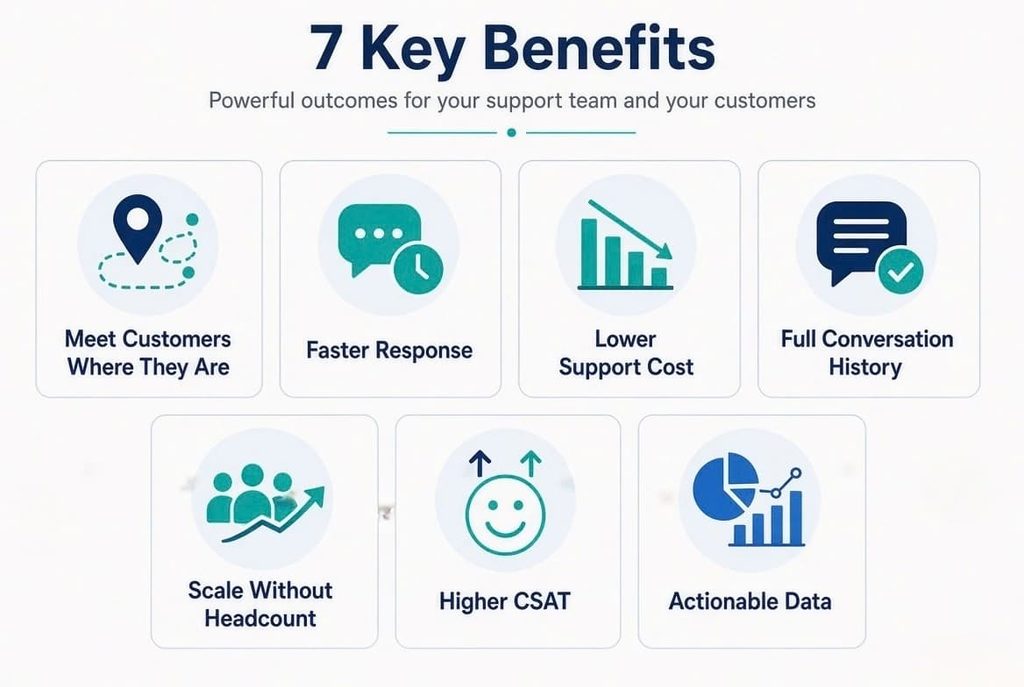
WhatsApp is more than just a messaging app in India; it’s a way of life. Over 487 million Indians use it daily, across every age group and income segment. You completely eliminate the friction when you provide help over WhatsApp. Customers don’t need to download an app, create an account, or remember a portal login. They just tap and message.
The open rate of WhatsApp messages is 98%, while that of emails is only 20%. When a customer sends a support message, they expect a reply within minutes, not days. A ticketing system with automated first responses and smart routing ensures your team acknowledges every message instantly, even during peak hours.
Automated chatbots can handle 40–60% of routine queries without any human intervention. Questions about delivery timelines, refund policies, product specifications, or store hours don’t need a live agent every single time. By deflecting repetitive queries, your team focuses only on conversations that genuinely require human judgment.
One of the most frustrating experiences for a customer is having to re-explain their issue every time they contact support. A WhatsApp ticketing system stores the complete conversation thread, past interactions, purchases, and notes — giving any agent full context from the very first line of a new conversation.
Whether your team is handling 50 or 5,000 tickets a day, a well-configured WhatsApp ticketing system scales with you. Add agents, create new routing rules, deploy additional chatbot flows, and expand your operations without the cost of hiring a proportionally larger support team.
Faster responses, personalised replies, and consistent follow-through translate directly into happier customers. Happy customers stay longer, spend more, and refer others. In competitive markets like Mumbai’s e-commerce, retail, and fintech sectors, customer experience is often the defining difference.
Every ticket closed is a data point. Over time, your support analytics reveal the most common pain points, peak query times, agent efficiency gaps, and trends in customer dissatisfaction — all of which are invaluable inputs for product improvement, staffing, and marketing decisions.
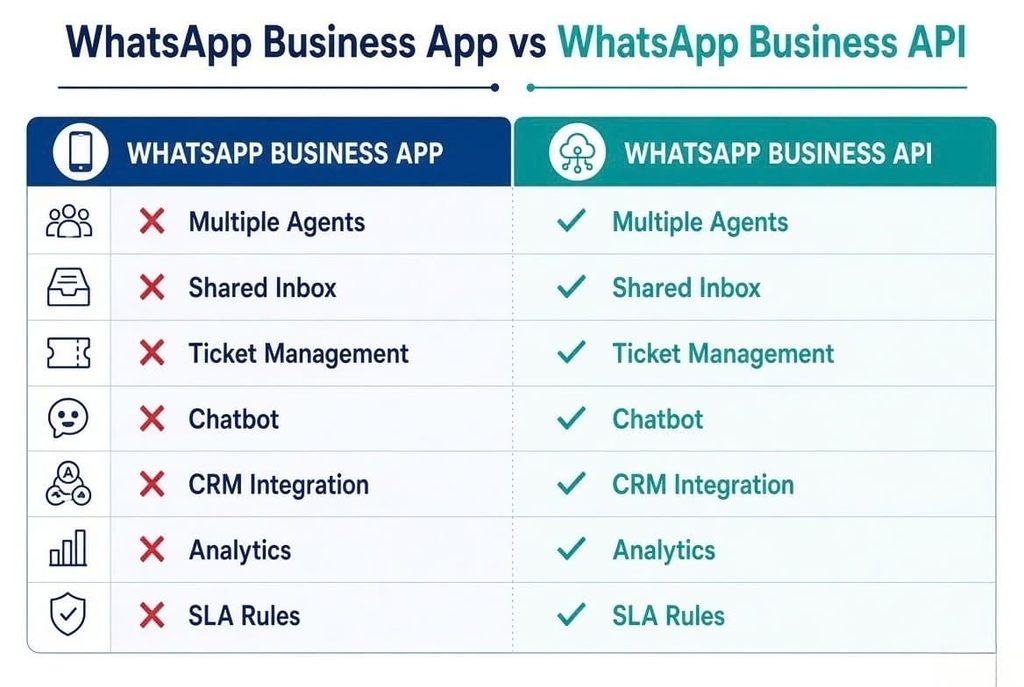
This is the most critical distinction for any Indian business considering WhatsApp for customer support. Only one of the two tools—the standard WhatsApp Business App and the WhatsApp Business API—supports an appropriate ticketing system.
| Feature | WhatsApp Business App | WhatsApp Business API |
| Multiple Agents | ✗ 1 device only | ✓ Unlimited agents |
| Shared Inbox | ✗ Not available | ✓ Full team inbox |
| Ticket Management | ✗ Manual labels only | ✓ Complete ticketing system |
| Chatbot / Automation | ✗ Basic auto-replies only | ✓ Full chatbot + workflow automation |
| CRM Integration | ✗ Not supported | ✓ Zoho, HubSpot, Freshdesk, and more |
| Analytics & Reporting | ✗ Very limited | ✓ Real-time dashboards |
| Broadcast to 1000+ Users | ✗ Capped | ✓ No limit with proper opt-ins |
| SLA & Escalation Rules | ✗ Not available | ✓ Fully configurable |
| Best For | Micro-businesses & freelancers | Growing businesses & enterprises |
Bottom Line
If you are serious about customer support at scale — even 20+ tickets per day — you need the WhatsApp Business API, not the standard app. The API is what powers a genuine WhatsApp support ticketing system. Sigmaflux is an official WhatsApp Business API partner in India and can get your business set up quickly.
Setting up a WhatsApp support ticketing system may sound complex, but with the right Business Solution Provider (BSP) like Sigmaflux, the process is straightforward. Here is what it looks like end-to-end:
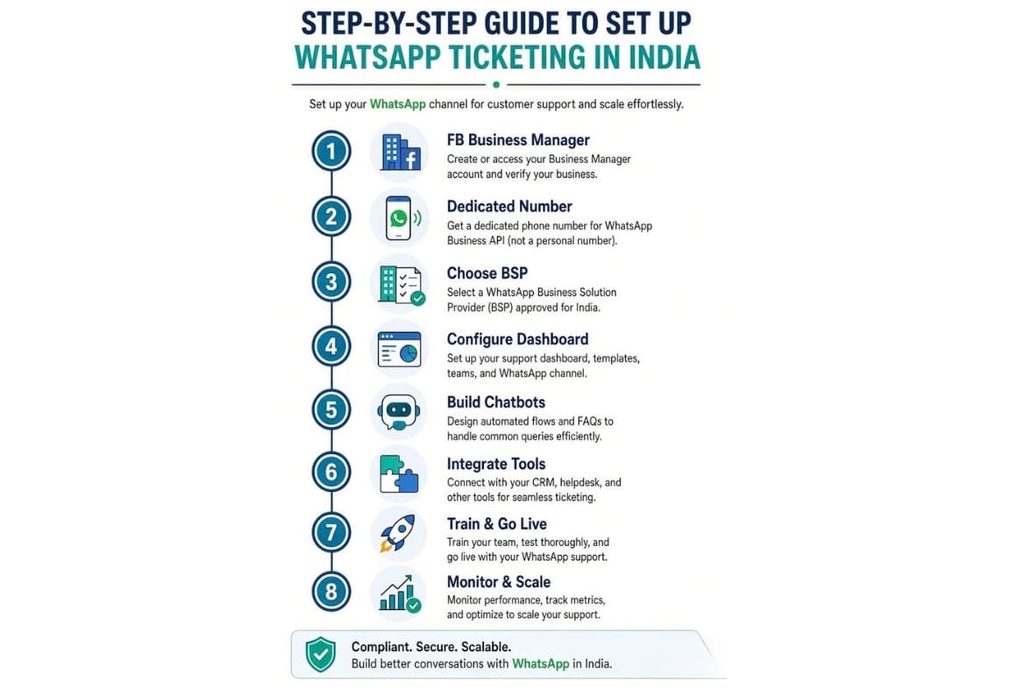
To apply for the WhatsApp Business API, you must have a validated Facebook Business Manager account. If you already have one, ensure it’s properly verified with your business details, GST number (for Indian businesses), and your business website URL.
Select a phone number that is not currently registered with any personal or WhatsApp Business account. For all communications with customers, this will be your official business WhatsApp number. Most Indian businesses use a dedicated virtual or SIM-based number for this purpose.
This is where a company like Sigmaflux comes in. As an authorised WhatsApp Business Solution Provider in Mumbai, we handle your embedded sign-up, Meta verification, API integration, and account approval — significantly reducing your setup time and technical burden.
Once your API access is active, set up your shared team inbox, create agent profiles, define department queues (e.g., Sales, Support, Billing), and establish ticket routing rules. Sigmaflux provides a guided configuration process tailored to your business needs.
Design automated responses for your most common queries. Set up a welcome message, FAQ bot, lead qualification flow, or appointment booking system — all within WhatsApp. Sigmaflux offers ready-to-deploy chatbot templates for Indian industries, including e-commerce, healthcare, education, and real estate.
Connect your WhatsApp ticketing system with your CRM (Zoho, HubSpot, Salesforce), e-commerce platform (Shopify, WooCommerce), or ERP system. This ensures your support agents always have order history, customer details, and relevant data right inside the chat window.
Onboard your support team with clear SOPs (Standard Operating Procedures) for ticket handling, escalation paths, and response guidelines. Sigmaflux provides hands-on training for your team as part of the onboarding process. Set your SLA targets and you are ready to go live.
8. Monitor, Optimise, and Scale
Review your weekly analytics — FRT, resolution rates, CSAT scores, top ticket categories — and continuously refine your workflows. As your business grows, add more agents, create new chatbot flows, and expand your automation without rebuilding from scratch.
WhatsApp support ticketing is not a one-size-fits-all solution for one specific industry. Across Mumbai’s diverse business landscape, companies in virtually every sector are transforming their customer support with it.
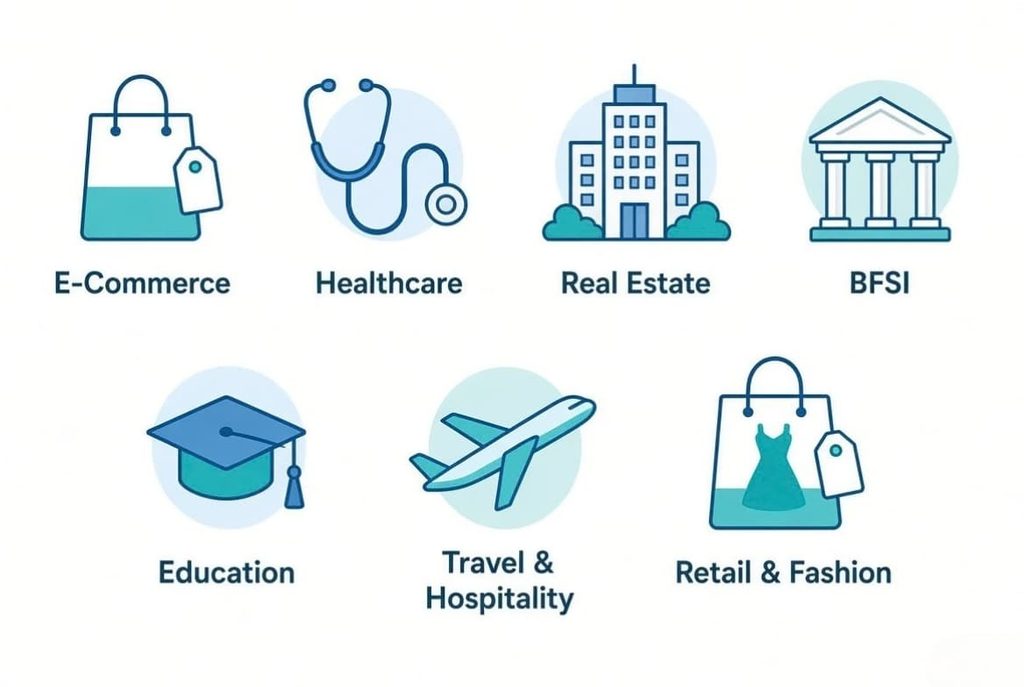
For fast-growing e-commerce businesses, WhatsApp ticketing is a game-changer. Order tracking, return requests, COD confirmations, and delivery queries — all managed systematically. Chatbots handle WISMO (Where Is My Order) queries automatically, freeing agents for escalations and refund approvals.
Hospitals, diagnostic centres, and private clinics in Mumbai use WhatsApp ticketing to manage appointment bookings, lab report queries, discharge summaries, and insurance pre-auth requests. With 24/7 availability through chatbots and prioritisation for urgent health queries, patient satisfaction improves significantly.
Mumbai’s property market moves fast. Builders and brokers use WhatsApp ticketing to manage site visit requests, property availability queries, documentation follow-ups, and post-sale service complaints — all in an organised, accountable way.
For NBFCs, insurance companies, and digital lenders serving Mumbai’s huge financial ecosystem, WhatsApp ticketing enables compliant, auditable customer interactions. Loan application follow-ups, EMI queries, policy renewal reminders, and KYC escalations are all managed through a traceable ticketing system.
Coaching institutes, schools, and ed-tech platforms use WhatsApp to manage admission queries, fee payment confirmations, timetable updates, and student support — at scale, without proportionally expanding their administrative staff.
From boutique hotels in South Mumbai to travel agencies handling international packages, WhatsApp ticketing helps manage booking confirmations, itinerary changes, refund requests, and guest feedback in one streamlined system.
Multi-location retail brands and fashion labels use WhatsApp ticketing for post-purchase support, exchange requests, loyalty programme queries, and personalised styling assistance — creating a premium customer experience at every touchpoint.
WhatsApp only allows free-form messages within 24 hours of the last customer message. After that, businesses must use pre-approved Message Templates to re-engage — which can have associated costs.
The Fix: Use chatbots to send an immediate automated acknowledgement the moment a customer messages. This resets the 24-hour clock and gives your team time to respond. Also, set up SLA alerts so no ticket crosses 12 hours without attention.
Relying too heavily on chatbots without clear human handoff rules leads to frustrated customers receiving robotic, irrelevant responses to complex problems.
The Fix: Design every chatbot flow with a clear “Talk to a Human” escape hatch. Use chatbots for first-touch, data collection, and simple FAQs. The moment a query requires nuance, judgment, or emotional sensitivity, escalate to a live agent automatically.
Many Indian businesses have customer data spread across email, their website CRM, billing software, and WhatsApp — with no connection between them. Agents waste time switching between systems and often miss important context.
The Fix: Choose a WhatsApp ticketing system that integrates natively with your existing tools. Sigmaflux supports integrations with Zoho, Shopify, Razorpay, HubSpot, Freshdesk, and more — creating a unified customer view directly inside your WhatsApp inbox.
Rolling out a new ticketing system requires your support team to change how they work. Without proper training and buy-in, adoption suffers, and the system underperforms.
The Fix: Work with your BSP to build clear SOPs and conduct structured training sessions before going live. Sigmaflux provides hands-on onboarding training and post-launch support to ensure your team is confident and productive from day one.
Festive seasons like Diwali, Holi, and end-of-financial-year periods can cause a 3–5x spike in support tickets for many Indian businesses. Manual processes collapse under this load.
The Fix: Pre-build chatbot flows specific to peak-season queries. Increase chatbot deflection, set up proactive outreach for common queries (e.g., “Your order will be delivered by…”), and add temporary agents to your shared inbox without any system reconfiguration.
Sigmaflux is India’s leading WhatsApp Business API agency, headquartered in Mumbai. We have helped hundreds of businesses across Maharashtra and India transform their customer support operations with battle-tested WhatsApp ticketing solutions — built specifically for the Indian market.
The question isn’t really “which is better” — it’s “which meets your customers where they are.” Traditional helpdesks like Zendesk and Freshdesk are powerful, but they assume your customers will come to a web portal or send an email. In India, that assumption is increasingly outdated.
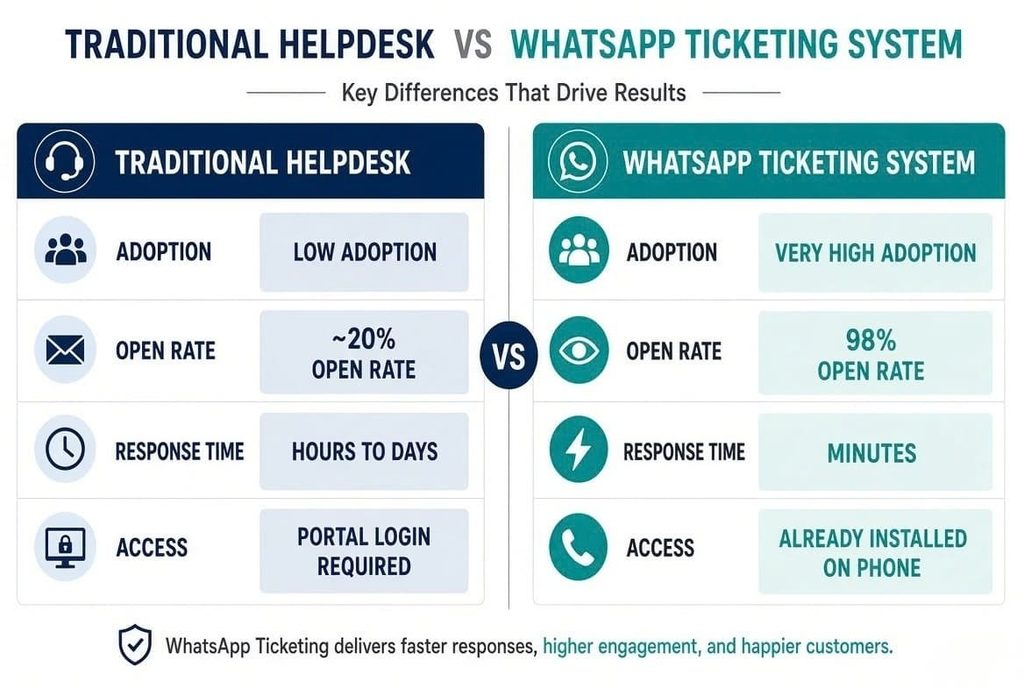
| Criteria | Traditional Helpdesk | WhatsApp Ticketing System |
| Customer adoption in India | Low — requires email or portal login | Very High — WhatsApp is already installed |
| Message open rates | ~20% (email) | ~98% (WhatsApp) |
| Response speed expectation | Hours to days | Minutes |
| Media support (images, docs, audio) | Limited | Native — photos, PDFs, voice notes |
| Chatbot & automation | Possible, but costly | Native and cost-effective |
| Setup complexity | High — training, portal customisation | Low — customers already know WhatsApp |
| Cost per interaction | Higher (per-agent licensing) | Lower with chatbot deflection |
For most Indian businesses, especially those serving consumers directly, a WhatsApp-first support strategy is not just a nice-to-have — it’s a competitive necessity. Pairing WhatsApp ticketing with your existing helpdesk (if needed) gives you the best of both worlds.
What distinguishes a WhatsApp support ticketing system from standard WhatsApp?
A WhatsApp support ticketing system is a professional platform built on the WhatsApp Business API that converts every incoming customer message into a structured, trackable ticket. Unlike the regular WhatsApp or WhatsApp Business App, a ticketing system supports multiple agents, automated routing, chatbots, CRM integrations, and analytics — making it suitable for businesses that receive more than a few support questions per day.
Does a ticketing system need the use of the WhatsApp Business API?
Yes. The standard WhatsApp Business App only supports one device, basic auto-replies, and manual labelling. It does not support multi-agent access, ticket routing, chatbots, or third-party integrations — all of which are essential features of a proper WhatsApp ticketing system. The WhatsApp Business API, accessed through an authorised BSP like Sigmaflux, unlocks all of these capabilities.
How much does a WhatsApp support ticketing system cost in India?
Costs in India vary based on your conversation volume, number of agents, and the features you need. WhatsApp charges per conversation (user-initiated and business-initiated), and your BSP charges a platform or service fee. Sigmaflux offers flexible plans tailored to Indian startups, SMBs, and enterprise clients — with transparent pricing and no hidden costs. Contact us for a price customized to your particular requirements.
Can I integrate WhatsApp ticketing with my existing CRM like Zoho or HubSpot?
Absolutely. One of the key advantages of a WhatsApp ticketing system built on the API is its ability to integrate with virtually any CRM, helpdesk, or e-commerce platform. Sigmaflux supports native integrations with Zoho CRM, HubSpot, Freshdesk, Shopify, WooCommerce, Razorpay, and many more. Proprietary systems can also benefit from custom API connectors.
Is a WhatsApp ticketing system suitable for small businesses in Mumbai?
Yes — in fact, small businesses often benefit the most. Even if you are a team of 5 handling 50 tickets a day, a WhatsApp ticketing system ensures no message falls through the cracks, response times are consistent, and one agent’s absence doesn’t disrupt your entire support operation. The chatbot automation also means you can provide 24/7 first-response coverage without hiring night-shift staff.
Can WhatsApp ticketing support multiple languages for Indian customers?
Yes. WhatsApp itself supports all Indian languages, and a well-configured chatbot and ticketing system can handle conversations in Hindi, Marathi, Gujarati, Tamil, Telugu, Kannada, and other regional languages. Sigmaflux specialises in multilingual WhatsApp setups for Indian businesses, helping you serve customers in their preferred language — which significantly improves resolution rates and satisfaction.
How long does it take to set up a WhatsApp ticketing system?
With Sigmaflux handling your WhatsApp Business API application and ticketing system setup, most businesses are live within 3–7 business days for a standard implementation. Complex setups with custom CRM integrations, multilingual chatbots, or advanced routing rules may take 2–4 weeks. We provide a detailed onboarding timeline upfront so you know exactly what to expect.
What analytics does a WhatsApp ticketing system provide?
A comprehensive WhatsApp ticketing system provides: First Response Time (FRT), Average Resolution Time, Ticket Volume by category, day, and agent, CSAT (Customer Satisfaction) scores, Chatbot deflection rates, Agent performance comparisons, SLA breach alerts, and Customer re-engagement rates. These metrics help managers make data-driven decisions about staffing, process improvements, and product/service changes.
Is WhatsApp Business API compliant with Indian data privacy regulations?
Customer and business conversations over the WhatsApp Business API are encrypted from beginning to end. Meta maintains data infrastructure in compliance with applicable regulations. For Indian businesses, it is important to have a proper opt-in mechanism before messaging customers, comply with the Digital Personal Data Protection Act 2023, and use only pre-approved templates for outbound proactive messages. Sigmaflux guides every client through compliance best practices during onboarding.
Why choose Sigmaflux as our WhatsApp ticketing system company in Mumbai?
Sigmaflux is an authorised WhatsApp Business API partner with deep expertise in the Indian market. We provide end-to-end setup, custom chatbot development, CRM integrations, team training, and ongoing support. Our clients across Mumbai, Pune, Bengaluru, and other major Indian cities trust us because we understand both the technical requirements of WhatsApp’s platform and the operational realities of running a business in India.