
WhatsApp API
sigmaflux
0 comments August 20, 2026

How to Use Your Existing Number with the WhatsApp API for Bulk WhatsApp Marketing

API for bulk marketing purposes is uncomplicated and very straightforward. If you have your business using an active phone number that your customers are familiar with, you have the possibility of migrating your pre-existing number to the WhatsApp API without having to lose any chat conversation data during the transfer.

That is important as most Indian companies, including those in Mumbai, have been running the WhatsApp Business application on that phone number for quite some time now. Migrating to the API doesn’t mean changing your number – it means adding capabilities to it, enabling you to conduct bulk messaging and automate conversations via CRM.

Here is the complete guide to migrating your number and conducting bulk marketing via the API.
Key Takeaways

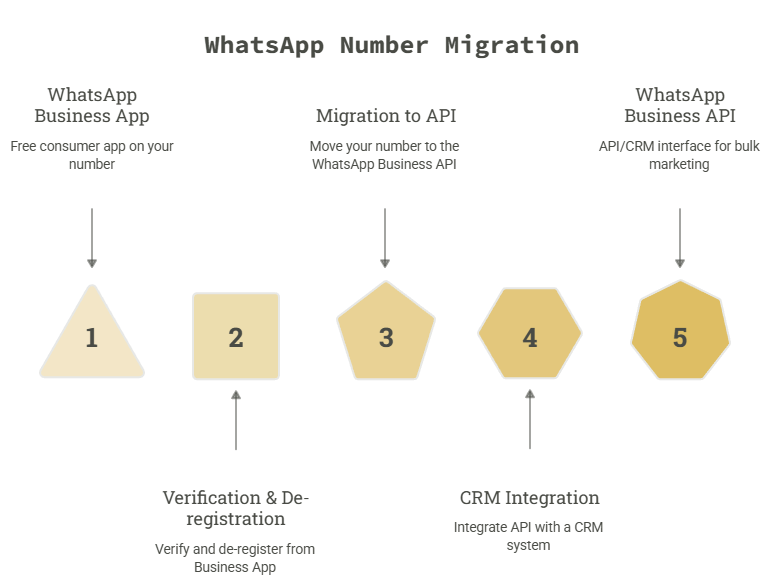
  • Your existing WhatsApp number can be moved to the WhatsApp Business API — no new number is required.
  • The number must be verified and de-registered from the WhatsApp Business App before migration.
  • Once migrated, you lose access to the free consumer app on that number and manage everything through an API/CRM interface instead.
  • Bulk marketing on the API requires pre-approved message templates and recipient opt-in — it isn’t the same as regular chatting.
  • A CRM layer on top of the API is what makes bulk sending, automation, and team collaboration actually usable.

Definition of the WhatsApp Business API

The WhatsApp Business API is a product of Meta that allows businesses to exchange messages via WhatsApp using software and not an app on their phones. The WhatsApp Business API is meant to cater to businesses that deal with high volumes of messages, have many support personnel, or require automation, which is impossible using the app itself.

In contrast to the app, the API does not have its own chat interface; thus, it needs to be connected to some CRM or messaging system, such as the SigmaFlux WhatsApp API CRM.

Can You Really Use Your Existing WhatsApp Number?

Yes. Meta allows you to migrate an existing WhatsApp number — one already active on the WhatsApp Business App or even a personal WhatsApp account — onto the Business API, as long as it meets a few conditions.

Your number qualifies if:

  • It may be used for OTP verification via SMS or call.
  • Currently, there are no restrictions imposed on the use of such a number by WhatsApp.
  • You are the person who can verify the business account (Meta Business Manager).
  • The one thing you should keep in mind about using the phone number on WhatsApp API:

Once the phone number is operational on the WhatsApp API, it cannot be used in the official WhatsApp Business application anymore.

How to Migrate Your Existing Number to WhatsApp API

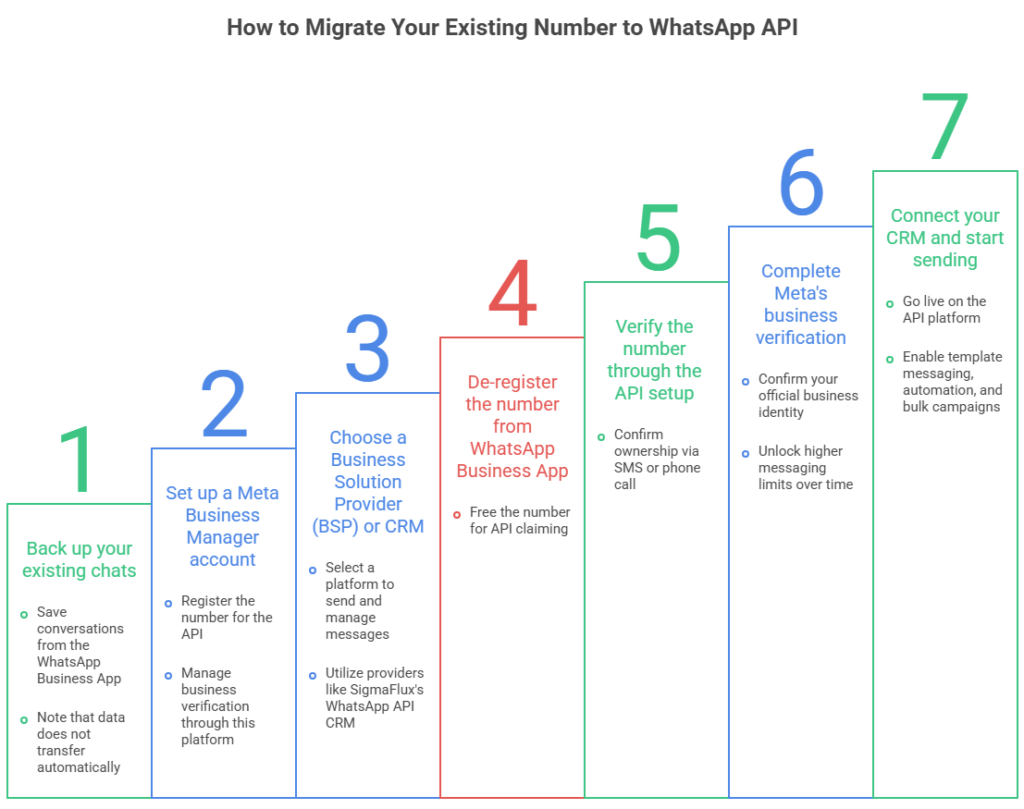
Migrating a number is a defined process, not a guess-and-check exercise. Here’s the sequence:

  1. Back up your existing chats. If the number is currently on the WhatsApp Business App, back up conversations first — this data doesn’t carry over automatically to the API.
  2. Set up a Meta Business Manager account. This is required to register any number for the API, and it’s where you’ll manage business verification.
  3. Choose a Business Solution Provider (BSP) or CRM. You need a platform to actually send and manage messages — this is where a provider like SigmaFlux’s WhatsApp API CRM comes in.
  4. De-register the number from the WhatsApp Business App. This step frees the number so it can be claimed by the API.
  5. Verify the number through the API setup. You’ll receive an OTP by SMS or call to confirm ownership.
  6. Complete Meta’s business verification. This confirms your business identity and unlocks higher messaging limits over time.
  7. Connect your CRM and start sending. Once verified, your number is live on the API and ready for template-based messaging, automation, and bulk campaigns.

Most migrations, when the business documentation is ready in advance, are completed within 24–48 hours.
What Businesses Should Know Before Migrating

A few practical points that aren’t always obvious upfront:

  • Group chats don’t transfer. Any groups the number was part of on the consumer app will be lost after migration.
  • Message templates need pre-approval. Anything you send beyond a live customer reply (like a promotional blast) must first be submitted to Meta as a template and approved.
  • There’s a learning curve on messaging limits. New API numbers start with a limited daily messaging tier, which increases as WhatsApp sees consistent quality engagement.
  • You’ll need a CRM, not just API access. Raw API access without a CRM layer means managing everything through code or Meta’s basic tools — not practical for daily marketing and support use.

How to Use the Migrated Number for Bulk WhatsApp Marketing

Once your number is live on the API, bulk marketing works differently from a manual broadcast list on the app.

Here’s what changes:

AspectWhatsApp Business AppWhatsApp API (with CRM)
Sending limit~256 contacts per broadcastThousands, based on tier
Message typeFree-form textPre-approved templates for promotions
AutomationManual onlyAuto-replies, drip sequences, chatbots
Team accessSingle deviceMultiple agents, shared inbox
TrackingNoneDelivery, read, and click reporting

To run a compliant bulk campaign:

  1. Build a contact list of customers who’ve opted in to receive WhatsApp messages from you — cold, unsolicited bulk sends risk your number getting banned.
  2. Create a message template (promotional, transactional, or utility) and submit it for Meta’s approval.
  3. Segment your audience inside the CRM based on past purchases, location, or engagement.
  4. Schedule and send the approved template to your segmented list.
  5. Track delivery and read rates, and follow up with warm leads through one-on-one replies, which don’t require a template.

Common Mistakes to Avoid

  • Skipping opt-in collection. Sending bulk promotional messages to numbers that haven’t consented is the fastest way to get flagged or banned.
  • Migrating without backing up chat history. This data can’t be recovered after de-registration.
  • Treating the API like the app. Free-form bulk texting doesn’t work on the API — everything outside an active conversation needs an approved template.
  • Choosing a provider without CRM support. API access alone isn’t enough for a marketing team to actually operate day-to-day.

Frequently Asked Questions

Can I use the same WhatsApp number on both the app and the API?
No. Once a number is registered to the WhatsApp Business API, it’s removed from the WhatsApp Business App and can only be used through the API/CRM going forward.

Will I lose my existing chats when I migrate?
Yes, unless you back them up first. The API doesn’t inherit chat history from the consumer app, so exporting a backup before de-registering the number is essential.

How long does it take to migrate a number to WhatsApp API?
With business documents and Meta Business Manager verification ready in advance, migration typically takes 24–48 hours.

Do I need Meta’s approval to send bulk marketing messages?
Yes. Any promotional or bulk message sent outside an active customer conversation must use a pre-approved message template.

Is a CRM required to use WhatsApp API, or can I use the API directly?
Technically, you can integrate the raw API yourself, but for day-to-day marketing, automation, and team use, a CRM interface — like SigmaFlux’s WhatsApp API CRM — is what makes it practical to manage.

Conclusion

Moving your existing WhatsApp number to the Business API doesn’t mean starting fresh — it means unlocking bulk marketing, automation, and team collaboration on a number your customers already know. The process is straightforward once your business verification and CRM are in place, and the payoff is a WhatsApp channel that can actually scale with your business instead of being limited to one device and one inbox.

If you’re planning this migration for your business in Mumbai or anywhere in India, SigmaFlux Agency’s WhatsApp API CRM handles the number migration, template approvals, and bulk marketing setup end-to-end.


sigmaflux

previous post next post
Open chat
WhatApp Us!
Hello 👋
Can we help you?