

Google Search Console & SEO Annotations Guide
What Is Google Search Console & How Annotations Improve SEO Insights
One of the main components of Search Engine Optimisation (SEO) is understanding how your website performs in search. Google Search Console (GSC) is a free service that allows you to view the appearance of your website in Google, which keywords drive traffic to your site, and any visibility issues. Annotations are used to indicate significant events in your site’s history so that you can see how these events affect your SEO metrics. Together, GSC and annotating will allow you to develop a concise, easy-to-track narrative of your website’s growth.
This blog explains Google Search Console and annotations in a simple, practical way so anyone—from beginners to digital marketers—can understand how to use them effectively.
What is Google Search Console, Annotations
Using Google Search Console provides insight into how your site performs within Google Search. It gives you information such as which pages were viewed by users, what query was used to find that page (search terms), how often your site is shown on a user’s screen, whether you have any errors on your site, etc., by using the data collected by Google Analytics.
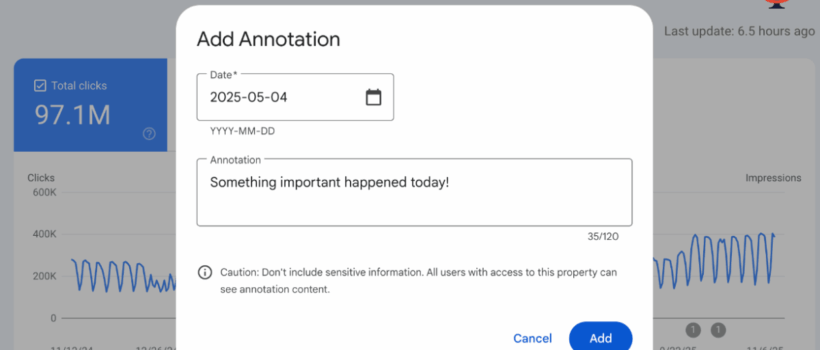
With annotations, you can add notes, comments, and reminders to your SEO Timeline within Google Search Console.
Google Search Console Displays Metrics that Measure Your Website’s Performance
The effectiveness of a website can be monitored using Google Search Console through the use of analytics such as impressions, clicks, average daily rank, and click-through rate (CTR). With this data at hand, it will enable you to better understand your successful pieces of content compared to those that may require improvement.
An Example of Using GSC to Measure Google SEO Changes with Annotations
When your traffic goes up or down, annotations help you understand the reason. A good SEO example of what an annotation would look like would be if you made a major update to your site and then tracked your site’s performance before and after by marking the date of the update.
How Annotations Help You Identify Key SEO Events
An annotation is similar to a bookmark, as you can add an annotation every time an update is made to your site, whether that is creating new content, fixing issues, or rebranding the website. Annotations allow you to identify the trends of your updates/revisions with more confidence because they do not rely on estimated times.
What is the purpose of Annotations?
Annotations are designed to link your update actions back to their results. You might forget why traffic dropped or increased. With annotations, you have a clear timeline of changes.
How Annotations Add Context to Your SEO Data
Instead of digging through old messages or documents, annotations show everything directly inside your SEO tracking tool. One quick look and you know the context of any performance change.
For the most effective use of annotations regarding your SEO–
Related activities, add them whenever you add a new technique/ strategy, correct an issue, release important content, or see a spike or drop-off in SERP rankings.
The Importance of Marking SEO Updates for Reporting
By marking all SEO changes in the form of annotations, you have an exact representation of why the new data exists at the current value without assuming anything or having to remember what happened.
Reasons to Use Annotations
Using annotations will help you to keep both the clarity of your SEO process and reduce the chance of confusion. Annotating helps everyone in your company to stay aligned and be more effective in making good decisions
Keeping Track of Algorithm Changes and Ranking Changes
Google is constantly changing its algorithm. If you have seen your traffic drop suddenly, use an annotation to tell you if that was a result of an update or something wrong with your website.
Monitoring Website Changes and Fixes that Fix Website Problems
When your website is updated, such as fixing broken links, adding/updating your sitemap, and improving the load speed of your website, these changes can affect the performance of your website. Using annotations will allow you to follow the results of these types of changes.
Better Reports for SEO Teams to Understand What is Happening.
Teams can easily check what happened on specific dates without asking multiple people. More Enhanced Reporting For SEO Teams To Have A Better Understanding Of Everything Related To Their Website.
Google Search Console (GSC) is An SEO Framework
GSC is designed to provide information on how well a website is performing. Google gives you tools to monitor traffic, page indexing, and the overall quality of pages indexed.
Understanding Search Traffic and User Queries
GSC allows you to understand the keywords used by users to find your website and enables you to create better content that satisfies users’ search intent.
Identifying Problems with Your Website and Getting Indexed
If Google is unable to crawl your pages, you will receive a notification from GSC. This will allow you to correct any mistakes before they impact your SEO negatively.
Enhancing Site Performance with GSC Insights
GSC also provides essential information that allows you to improve user experience, from mobile usability to page experience..
Using GSC for Search Engine Optimisation (SEO)
Using GSC effectively helps you plan your SEO strategy and track results.
Setting Up Google Search Console for Your Website
To gain complete access and view all of the insights available to you via Google Search Console, you must first create an account, add your website as a property, and verify the ownership of the website.
Performance Reports for Improving Keyword Optimization
The Performance section will show your best-performing keywords. You can take the information from this section of Search Console to edit your content and improve the Ranking of your website.
Using Coverage Reports to Resolve Issues with Your Website
The Coverage reports will show which pages have problems (e.g., pages that are not indexed, Server Errors, and Redirect issues). Fixing these helps improve your SEO health.
Examples Of Annotations (Three Cases)
Below are three examples of when you could use annotations to record SEO updates:
Google Algorithm Update Impact
When a business’s rankings are affected by a Google algorithm update, they will be able to refer back to the date of the update and how their rankings have changed over time.
Website redesign and/or Migration
The redesign of your website may create significant impacts on your SEO. Annotations help you track performance after such updates.
Major Content Update or SEO Fix
With the ability to potentially fix multiple SEO issues within an older blog, annotations allow you to track the success of your updates over time.
Five Steps to Annotate:
Using annotations is simple when you have a well-defined process to follow.
Identify the Event
First, decide which event is important enough to annotate.
Choose the Correct Date
Select the exact date the change occurred.
Add Clear Notes
Write simple, meaningful notes to explain what happened.
Review the Impact
As days pass, check how the annotation aligns with your SEO performance.
Use Annotations in Reporting
Include your annotations in reports so your team understands the context.
Can Google Search Console Improve SEO?
Yes, GSC helps improve SEO when used consistently.
Finding and optimizing high-performing keywords
requires analyzing the performance of those keywords by analyzing the click-through rates of your search results.
Boosting Organic Visibility with Search Analytics
Search analytics shows growth opportunities. You can optimize pages that already rank but need a boost.
Fixing Website Errors Using GSC Tools
GSC reports issues directly so you can fix them before they impact your rankings.
What Are Common Annotation Mistakes?
Even though annotations are simple, people sometimes make mistakes.
Missing Important SEO Events
If you forget to annotate major events, you lose valuable context later.
Writing Vague or Incomplete Notes
Your notes should be clear. For example, “Updated title tags on 5 pages” is better than just “Updated site.”
Not Reviewing Annotation Data During SEO Analysis
Annotations are useful only if you check them while analyzing trends.
Conclusion
Google Search Console is one of the best tools to analyze your website’s performance and gain insight into how you can improve your website’s SEO and organic search visibility. The ability to use annotations alongside Google Search Console is an extremely effective way to track important events (social media announcements, site redesigns, etc.) as well as help with the understanding of how changes in data have affected a given site’s search rankings. Whether you are working on one or multiple websites, using annotations helps to keep your workflow organized and helps you make accurate SEO reports.
If you are looking for more insightful SEO data, use and consistently utilize annotations. They allow you to see trends clearly and improve the quality of your SEO efforts overall.

sigmaflux